
TO ALL MEMBERS: PM (private message) Notification emails from the forum

ancientdad

Administrator
Staff member
Joined
May 22, 2020
Total Posts
35,423
Total likes
12,730
Location
Nature Coast, FL
To all VHT members:

Please be aware that if your profile settings are adjusted to be notified when you receive a PM and you get a Notification email from the forum address about a PM received, please do NOT reply to the email. Remember that it is only a Notification email, so to reply you need to log into the forum and go to your private message inbox.


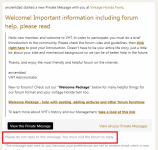
It's easy to forget and just start typing in response to the message preview in the Notification email, but when you click send on that reply it only goes to Jim and myself - the member who sent you the PM will never see your answer.

Here's a sample of what a notification email looks like, and the part that often gets overlooked.

No reply to Notifications.png
 
Last edited:
Just a reminder that when you receive a PM, replying to the Notification email will never get your response to the intended recipient (unless the recipient is either Jim [LDR] or myself).

No harm done aside from the fact that your reply will never reach your intended recipient. We'd hate for you to miss an opportunity to buy parts or even a bike from another member because you didn't notice.

AD
 
Last edited:
  • Like
Reactions: J-T
My SOC has an automatic email that goes out for certain alerts, and its an "unmonitored" email as well, except replies to it automatically generate incident tickets and are forwarded to everyone in the SOC.

Its always fun to have that laugh every once in a while, but repeat offenders will be told to stop 😂
 
This is the FINAL last reminder before the previews of PMs get turned off.
------------------------------------------------------------------------

Please be aware that if you're set to receive Notification emails and you get a Notification email about a PM received, please DO NOT reply to the Notification email. Remember that the email is only a Notification, so to reply to the PM it displays you need to log into the forum and go to your private message (PM) inbox.


It's easy to forget and just start typing in response to the message preview in the Notification email, but when you click send on that reply it only goes to the admins - the member who sent you the PM will never see your answer.

Here's a sample of what a notification email looks like, and the part that often gets overlooked.

No reply to Notifications.png


I'm only going to say this once more: if I get one more reply to a Notification email, I will remove the message preview in the Notification emails so you HAVE to log in to read them.
 
Okay, enough is enough. I'm tired of babysitting those who can't remember to actually log in when they get a Notification email letting them know they have a new PM.

As of right now, there will be no more message previews in the Notification emails so no one will be tempted to just click "reply" and forget that all replies to Notification emails only go to the staff.
 
Last edited:
It's still happening, even with the message content removed from PM Notification emails.

I spend 10 minutes looking up something for someone, likely because they never looked at all the provided information here about how to do it themselves, and they reply to the Notification email instead of the thread they just created less than a half hour prior.

REPLYING TO A NOTIFICATION EMAIL ABOUT AN UPDATE ON A THREAD YOU'RE WATCHING IS THE SAME THING.

Only the moderators and I will see it.

So as of today, there will be no more content in any Notification email.
 
Last edited:
Back
Top Bottom